> ## Documentation Index
> Fetch the complete documentation index at: https://mcp.transdocs.org/llms.txt
> Use this file to discover all available pages before exploring further.
# 提示
**协议修订**:2025-06-18
模型上下文协议 (MCP) 提供了一种标准化方式,让服务器将提示模板暴露给客户端。提示允许服务器提供结构化的消息和与语言模型交互的指令。客户端可以发现可用的提示,检索其内容,并提供参数以自定义提示。
## 用户交互模型
提示的设计是 **用户可控的**,意味着它们从服务器暴露给客户端时,旨在让用户能够显式地选择使用。
通常,提示会通过用户界面上的用户发起命令触发,这样用户可以自然地发现和调用可用提示。
例如,作为斜杠命令:
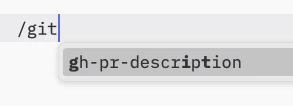 然而,实现者可以自由选择任何适合其需求的界面模式来暴露提示——协议本身不限定特定的用户交互模型。
## 能力
支持提示的服务器**必须**在[初始化](/specification/2025-06-18/basic/lifecycle#initialization)期间声明 `prompts` 能力:
```json theme={null}
{
"capabilities": {
"prompts": {
"listChanged": true
}
}
}
```
`listChanged` 表示服务器是否会在可用提示列表发生变化时发出通知。
## 协议消息
### 列出提示
要检索可用提示,客户端发送 `prompts/list` 请求。此操作支持[分页](/specification/2025-06-18/server/utilities/pagination)。
**请求:**
```json theme={null}
{
"jsonrpc": "2.0",
"id": 1,
"method": "prompts/list",
"params": {
"cursor": "可选的游标值"
}
}
```
**响应:**
```json theme={null}
{
"jsonrpc": "2.0",
"id": 1,
"result": {
"prompts": [
{
"name": "code_review",
"title": "请求代码审查",
"description": "要求LLM分析代码质量并提出改进建议",
"arguments": [
{
"name": "code",
"description": "需要审查的代码",
"required": true
}
]
}
],
"nextCursor": "下一页游标"
}
}
```
### 获取提示
要检索特定提示,客户端发送 `prompts/get` 请求。参数可以通过[补全API](/specification/2025-06-18/server/utilities/completion)自动补全。
**请求:**
```json theme={null}
{
"jsonrpc": "2.0",
"id": 2,
"method": "prompts/get",
"params": {
"name": "code_review",
"arguments": {
"code": "def hello():\n print('world')"
}
}
}
```
**响应:**
```json theme={null}
{
"jsonrpc": "2.0",
"id": 2,
"result": {
"description": "代码审查提示",
"messages": [
{
"role": "user",
"content": {
"type": "text",
"text": "请审查以下Python代码:\ndef hello():\n print('world')"
}
}
]
}
}
```
### 列表变更通知
当可用提示列表发生变化时,声明了 `listChanged` 能力的服务器**应该**发送通知:
```json theme={null}
{
"jsonrpc": "2.0",
"method": "notifications/prompts/list_changed"
}
```
## 消息流程
```mermaid theme={null}
sequenceDiagram
participant Client
participant Server
Note over Client,Server: 发现
Client->>Server: prompts/list
Server-->>Client: 提示列表
Note over Client,Server: 使用
Client->>Server: prompts/get
Server-->>Client: 提示内容
opt listChanged
Note over Client,Server: 变更
Server--)Client: prompts/list_changed
Client->>Server: prompts/list
Server-->>Client: 更新后的提示
end
```
## 数据类型
### 提示
提示定义包括:
* `name`: 提示的唯一标识符
* `title`: 可选的人类可读名称,用于显示
* `description`: 可选的人类可读描述
* `arguments`: 可选的参数列表,用于自定义
### 提示消息
提示中的消息可以包含:
* `role`: 为 "user" 或 "assistant",表示说话者
* `content`: 以下内容类型之一:
所有提示消息中的内容类型都支持可选的
[注解](/specification/2025-06-18/server/resources#annotations),用于标注受众、优先级和修改时间等元数据。
#### 文本内容
文本内容表示纯文本消息:
```json theme={null}
{
"type": "text",
"text": "消息的文本内容"
}
```
这是用于自然语言交互的最常见内容类型。
#### 图像内容
图像内容允许在消息中包含视觉信息:
```json theme={null}
{
"type": "image",
"data": "base64编码的图像数据",
"mimeType": "image/png"
}
```
图像数据**必须**为base64编码,并包含有效的MIME类型。这使得在需要视觉上下文的多模态交互中成为可能。
#### 音频内容
音频内容允许在消息中包含音频信息:
```json theme={null}
{
"type": "audio",
"data": "base64编码的音频数据",
"mimeType": "audio/wav"
}
```
音频数据**必须**为base64编码,并包含有效的MIME类型。这使得在需要音频上下文的多模态交互中成为可能。
#### 嵌入式资源
嵌入式资源允许在消息中直接引用服务器端资源:
```json theme={null}
{
"type": "resource",
"resource": {
"uri": "resource://example",
"name": "example",
"title": "我的示例资源",
"mimeType": "text/plain",
"text": "资源内容"
}
}
```
资源可以包含文本或二进制(blob)数据,并且**必须**包括:
* 有效的资源URI
* 合适的MIME类型
* 文本内容或base64编码的blob数据
嵌入式资源使提示能够无缝地将服务器管理的内容(如文档、代码示例或其他参考资料)直接集成到对话流程中。
## 错误处理
服务器**应该**对常见的失败情况返回标准JSON-RPC错误:
* 无效的提示名称:`-32602` (无效参数)
* 缺少必填参数:`-32602` (无效参数)
* 内部错误:`-32603` (内部错误)
## 实现注意事项
1. 服务器**应该**在处理前验证提示参数
2. 客户端**应该**处理大型提示列表的分页
3. 双方**应该**尊重能力协商
## 安全
实现**必须**仔细验证所有提示输入和输出,以防止注入攻击或未经授权访问资源。
然而,实现者可以自由选择任何适合其需求的界面模式来暴露提示——协议本身不限定特定的用户交互模型。
## 能力
支持提示的服务器**必须**在[初始化](/specification/2025-06-18/basic/lifecycle#initialization)期间声明 `prompts` 能力:
```json theme={null}
{
"capabilities": {
"prompts": {
"listChanged": true
}
}
}
```
`listChanged` 表示服务器是否会在可用提示列表发生变化时发出通知。
## 协议消息
### 列出提示
要检索可用提示,客户端发送 `prompts/list` 请求。此操作支持[分页](/specification/2025-06-18/server/utilities/pagination)。
**请求:**
```json theme={null}
{
"jsonrpc": "2.0",
"id": 1,
"method": "prompts/list",
"params": {
"cursor": "可选的游标值"
}
}
```
**响应:**
```json theme={null}
{
"jsonrpc": "2.0",
"id": 1,
"result": {
"prompts": [
{
"name": "code_review",
"title": "请求代码审查",
"description": "要求LLM分析代码质量并提出改进建议",
"arguments": [
{
"name": "code",
"description": "需要审查的代码",
"required": true
}
]
}
],
"nextCursor": "下一页游标"
}
}
```
### 获取提示
要检索特定提示,客户端发送 `prompts/get` 请求。参数可以通过[补全API](/specification/2025-06-18/server/utilities/completion)自动补全。
**请求:**
```json theme={null}
{
"jsonrpc": "2.0",
"id": 2,
"method": "prompts/get",
"params": {
"name": "code_review",
"arguments": {
"code": "def hello():\n print('world')"
}
}
}
```
**响应:**
```json theme={null}
{
"jsonrpc": "2.0",
"id": 2,
"result": {
"description": "代码审查提示",
"messages": [
{
"role": "user",
"content": {
"type": "text",
"text": "请审查以下Python代码:\ndef hello():\n print('world')"
}
}
]
}
}
```
### 列表变更通知
当可用提示列表发生变化时,声明了 `listChanged` 能力的服务器**应该**发送通知:
```json theme={null}
{
"jsonrpc": "2.0",
"method": "notifications/prompts/list_changed"
}
```
## 消息流程
```mermaid theme={null}
sequenceDiagram
participant Client
participant Server
Note over Client,Server: 发现
Client->>Server: prompts/list
Server-->>Client: 提示列表
Note over Client,Server: 使用
Client->>Server: prompts/get
Server-->>Client: 提示内容
opt listChanged
Note over Client,Server: 变更
Server--)Client: prompts/list_changed
Client->>Server: prompts/list
Server-->>Client: 更新后的提示
end
```
## 数据类型
### 提示
提示定义包括:
* `name`: 提示的唯一标识符
* `title`: 可选的人类可读名称,用于显示
* `description`: 可选的人类可读描述
* `arguments`: 可选的参数列表,用于自定义
### 提示消息
提示中的消息可以包含:
* `role`: 为 "user" 或 "assistant",表示说话者
* `content`: 以下内容类型之一:
所有提示消息中的内容类型都支持可选的
[注解](/specification/2025-06-18/server/resources#annotations),用于标注受众、优先级和修改时间等元数据。
#### 文本内容
文本内容表示纯文本消息:
```json theme={null}
{
"type": "text",
"text": "消息的文本内容"
}
```
这是用于自然语言交互的最常见内容类型。
#### 图像内容
图像内容允许在消息中包含视觉信息:
```json theme={null}
{
"type": "image",
"data": "base64编码的图像数据",
"mimeType": "image/png"
}
```
图像数据**必须**为base64编码,并包含有效的MIME类型。这使得在需要视觉上下文的多模态交互中成为可能。
#### 音频内容
音频内容允许在消息中包含音频信息:
```json theme={null}
{
"type": "audio",
"data": "base64编码的音频数据",
"mimeType": "audio/wav"
}
```
音频数据**必须**为base64编码,并包含有效的MIME类型。这使得在需要音频上下文的多模态交互中成为可能。
#### 嵌入式资源
嵌入式资源允许在消息中直接引用服务器端资源:
```json theme={null}
{
"type": "resource",
"resource": {
"uri": "resource://example",
"name": "example",
"title": "我的示例资源",
"mimeType": "text/plain",
"text": "资源内容"
}
}
```
资源可以包含文本或二进制(blob)数据,并且**必须**包括:
* 有效的资源URI
* 合适的MIME类型
* 文本内容或base64编码的blob数据
嵌入式资源使提示能够无缝地将服务器管理的内容(如文档、代码示例或其他参考资料)直接集成到对话流程中。
## 错误处理
服务器**应该**对常见的失败情况返回标准JSON-RPC错误:
* 无效的提示名称:`-32602` (无效参数)
* 缺少必填参数:`-32602` (无效参数)
* 内部错误:`-32603` (内部错误)
## 实现注意事项
1. 服务器**应该**在处理前验证提示参数
2. 客户端**应该**处理大型提示列表的分页
3. 双方**应该**尊重能力协商
## 安全
实现**必须**仔细验证所有提示输入和输出,以防止注入攻击或未经授权访问资源。